







Businesses today collect huge amounts of data. This information is a valuable asset. But this data often lives in different, disconnected systems. This isolation creates confusion and costs you opportunities.
Introduction
Your data is everywhere. It sits in your sales CRM. It is in your marketing platform. It is in your accounting software. This separation is a serious challenge.
The Challenge of Disparate Data
When your information is in different places, you have data silos. Your sales team does not see what marketing knows. Your service team has no idea about recent purchases. This disconnect leads to wasted time. It also creates poor customer experiences. You cannot make good decisions when you only see part of the picture.
The Promise of Data Synchronization
Data synchronization is the solution. It connects your separate software, for example your CRM, accounting platform, inventory system, or HR tools. Information flows automatically between them. This process creates a single, reliable source of truth. The benefits are clear. You get better data accuracy. You have more efficient workflows. You also get smarter business insights.
Understanding HubSpot Data Sync
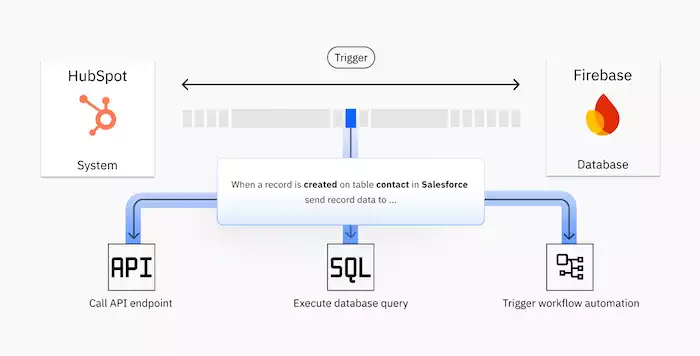
HubSpot Data Sync is a powerful tool. It keeps your business information aligned across all your applications.
What is HubSpot Data Sync?
HubSpot Data Sync creates a continuous, two-way flow of information. It connects HubSpot with your other essential apps. Data is updated automatically in both directions. This is different from a simple import. An import is a one-time event. It quickly becomes outdated. A basic integration might only send data one way. True sync is bidirectional and automated.
How HubSpot Data Sync Works (Core Concepts)
The setup involves a few key ideas. First is data mapping. You tell HubSpot which field in one app matches a field in another. For example, "Email Address" in HubSpot syncs with "Customer Email" in your store.
Next, you choose sync directions. You can have a one-way sync. Data flows only from System A to System B, or you can have a two-way sync. Data flows in both directions. An update in one system changes the other.
Finally, the system needs conflict resolution. What happens if the same contact is updated in both apps at the same time? You set rules to decide which system wins. You can also set rules to merge the data. This prevents duplicates. It also keeps your data clean.
Key Benefits of Using HubSpot Data Sync
When your data is in sync, you gain major advantages. Your data accuracy improves. Everyone uses the same information. This consistency is vital.
Workflows become more streamlined. Your teams stop wasting time on manual data entry. They can focus on their real jobs. You get a unified view of the entire customer journey. You see every touchpoint. This includes the first ad to the last support ticket. This complete picture allows for much better reporting and analytics.
Setting Up HubSpot Data Sync: A Step-by-Step Guide
The setup process is logical. You can follow clear steps to connect your systems. A little preparation makes the entire process much smoother.
Pre-Sync Checklist
Before you start, you must plan. First, identify your key data sources. What systems do you use? This includes your CRM, e-commerce site, or ERP. Second, define your objectives. What data needs to be where? What is your goal?
Third, you must clean your data. This is called data hygiene. Fix errors. Remove duplicates. Standardize formats before you sync.
Connecting Your Applications to HubSpot
The connection process starts inside your HubSpot portal. You navigate to the Data Sync settings. These are often found under "Connected Apps." From there, you will find a list of available applications. You select the app you want to connect. This could be Salesforce, Shopify, or NetSuite. You will then authorize the connection. This usually involves logging into the other app. You grant HubSpot permission.
Configuring Your Sync Settings
Configuration is the most important part. You choose the sync direction for different data types. Contacts might be a two-way sync. But orders from your e-commerce store might be a one-way sync into HubSpot.
Then, you map your properties. You match standard fields like "Name" and "Phone." You also map any custom fields. These are unique to your business. You can set up filters. This lets you sync only specific groups of records. For example, you might only sync new customers from the last 90 days. You also must set rules for handling conflicts and potential duplicates.
Initial Sync and Monitoring
You can start the first sync when you are confident in your settings. This initial transfer can take time if you have a lot of data. HubSpot will show you the progress. After it finishes, you must monitor the sync status. Check the error logs for any problems. You may need to troubleshoot common issues. A record might fail due to a formatting error.
Advanced Strategies for Maximizing HubSpot Data Sync
A basic sync is good. An optimized sync is a game-changer. You can use advanced features. These features tailor the sync to your exact business needs.
Smart Data Mapping & Efficient Syncing
Your business is unique. Your data should reflect that.Customize your data sync with tailored fields and conditional mapping to ensure accuracy across systems. At the same time, optimize sync frequency and filter records to reduce load and keep performance fast and efficient.
Utilizing Workflows and Automation with Synced Data
This is where the magic happens. You can use synced data as triggers for HubSpot workflows. A customer's status might change to "Canceled" in your payment system. The sync updates HubSpot. This change can automatically trigger an email sequence. The email can try to win them back. You can also automate tasks in your other apps. A new form in HubSpot can create a new record in your external CRM.
Ensuring Data Security and Compliance
You are responsible for the data you sync. It is critical to follow best practices for security. You must manage who has permission to change sync settings. You also need to follow data privacy regulations. Laws like GDPR and CCPA have strict rules. They govern how you handle personal data. Your sync strategy must be compliant.
Common Use Cases and Real-World Examples
Data sync is not just a technical tool. It solves real business problems across every department. It connects your teams through a common language: shared data.
Sales and CRM Integration
This is a classic use case. You sync leads and contacts between HubSpot and a sales CRM. When a marketer qualifies a lead in HubSpot, it instantly appears in the sales pipeline. When a salesperson closes a deal, that status syncs back to HubSpot. This alignment stops leads from falling through the cracks.
Marketing and E-commerce Integration
You can connect HubSpot to e-commerce platforms like Shopify. This syncs customer data and their complete purchase history. You can then build powerful marketing campaigns. You can personalize emails based on what a customer bought.
Service and Support Integration
You can connect help desk systems like Zendesk to HubSpot. This gives your service team a full view of the customer. They can see marketing emails and sales history. This information appears right inside the support ticket. This context helps them solve problems faster. It also syncs support tickets back to the HubSpot contact record.
Financial and ERP Integration
A sync with your financial or ERP system provides a complete business picture. You can sync invoice data and payment status. This lets your sales team know if a customer is past due. They will know this before they try to upsell them. It also helps with inventory. Marketing can stop promoting products that are out of stock.
Best Practices for a Successful Data Sync Strategy

A data sync is not a "set it and forget it" tool. It is a living part of your business operations. It requires ongoing care to deliver long-term value.
Regular Data Audits and Cleaning
You must maintain data quality. Schedule regular data audits. Look for inconsistencies or errors that have slipped in. Bad data spreads quickly when systems are synced. Make data cleaning a regular part of your routine.
Documentation and Training
Your sync configuration can become complex. You must create clear documentation. Write down what fields are mapped and why. Note any special rules or filters. You also need to train your teams. They must understand how the sync works. They need to know how it affects their daily tasks.
Continuous Monitoring and Optimization
Keep a close watch on your sync. Set up alerts. These should notify you immediately if a sync fails. Regularly review the performance. Are there new fields you need to map? Are your filters still correct? As your business changes, your sync settings may need to change, too.
Scalability and Future-Proofing
Always plan for the future. Your business will grow. You will add more data and new applications. Your sync strategy must be able to scale. Choose tools that are flexible. Sometimes, you may need to explore advanced options. This could include custom APIs for very specific integration needs.
If you're searching for a HubSpot alternative that better fits online sellers and fast-growing SMBs, Pancake CRM is a practical choice. While HubSpot offers a broad enterprise marketing suite, Pancake focuses on multichannel sales management, real-time customer conversation tracking, and simple automation that teams can adopt quickly. It delivers the essential CRM features most merchants need, at a more accessible cost and with tools built specifically for social commerce and e-commerce operations.
Conclusion
If you’re already using HubSpot to manage your customer data, you can enhance your operations by connecting it with automated chat flows on Botcake. When your chatbot collects new information and syncs it back into HubSpot, your team gets a fuller, more accurate customer view. This integration helps you run smoother workflows, personalize conversations, and deliver a better overall experience.