







Great customer service depends on how you handle support tickets. This process is more than just closing tasks. It is your chance to show customers they are heard, valued, and supported. Following strong ticket handling best practices, like fast responses, clear prioritization, and thoughtful follow-up, helps you resolve issues smoothly and build long-term trust.
Introduction
This guide provides a clear path to better support. We will explore the best ways to manage customer questions from start to finish.
The Importance of Effective Ticket Handling
Good ticket handling is very important for customer satisfaction. When you manage support well, you build trust and loyalty. Customers feel respected and understood. Poor ticket handling does the opposite. It creates frustration, and customers will leave. The best support is efficient for your team. It also shows you care about your customer.
What This Guide Will Cover
Think of this article as your roadmap. We will cover the basic needs for a strong support system. Then we will walk through the entire ticket process. Finally, we will look at how automation and smart metrics can help you build a great service team.
Setting the Foundation: Essential Principles
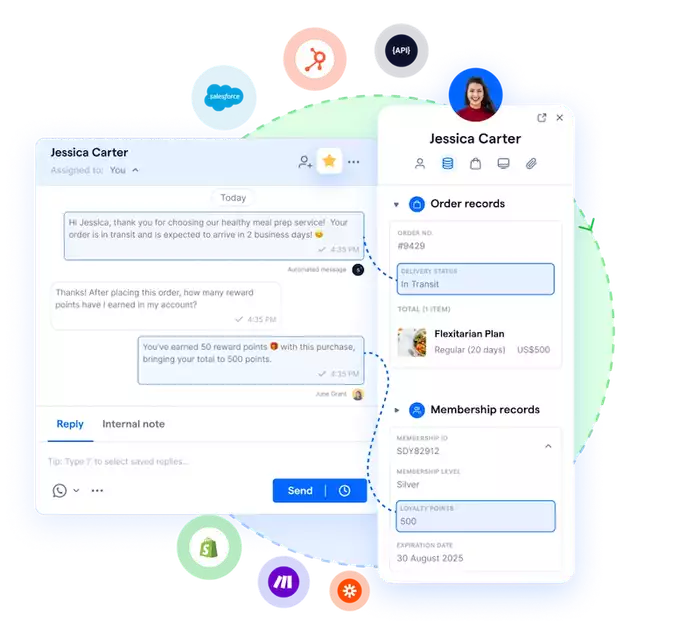
Before you can manage tickets well, you need a solid foundation. This starts with the right systems and clear roles for your team.
Centralized Ticketing System
Your team cannot work well if they hunt for messages in five different places. You need one single source of truth. A single ticketing system brings all customer talks into one place. This could be a normal system like Zendesk, Pancake or a modern chat automation platform. The key benefit is clarity. You avoid scattered messages. No ticket is lost. No customer is forgotten.
Clear Communication Channels
Customers must know exactly how to reach you. You should define your support channels. You must tell customers what they are. These might include email, a website chat widget, phone, or social media. Just as important, you must set clear expectations for response times. Let customers know if they can expect a reply in one hour or 24 hours.
Team Roles and Responsibilities
A ticket for a password reset is very different from a major system problem. Your team needs structure. You must define who handles what type of ticket. Many teams use different levels of support. Level 1 agents handle common questions. Level 2 agents handle harder technical issues. You need a clear path to pass hard problems to experts. An agent must know exactly who to send a difficult problem to. This avoids confusion. It also gets the customer a faster, more accurate answer.
The Ticket Lifecycle: Best Practices at Each Stage

A customer ticket has a life. It starts when the customer first contacts you. It ends only when they are satisfied. Here is how to manage each stage.
Ticket Creation and Prioritization
First, the ticket needs to enter your system. You can automate this process. An email or a chat message can automatically create a new support ticket. This ticket should also be categorized right away.
Next, set clear rules to sort tickets by urgency and impact, some issues require faster attention than others. If you receive tickets through chat platforms, tag each conversation and use these tags to filter and identify high-priority cases. This first sorting step ensures your team handles the most important issues first.
First Response and Acknowledgment
Speed matters, especially at the start. Customers want to know their message was received, even if you can’t solve it right away. A personalized auto-reply works well here, especially for after-hours requests, so customers still feel supported and heard while your team prepares the real solution.
This first response should also set realistic expectations. Tell the customer when they can expect a full response from a human agent. This is also your chance to gather more information. You might ask for an account number or a screenshot. This helps the agent solve the problem faster.
Investigation and Resolution
This core stage requires the agent to fully investigate to find the root cause, not just the surface issue. The team's knowledge base is essential for finding solutions. For complex problems, agents should easily collaborate with experts (like developers or billing specialists). The final solution must be delivered clearly, concisely, and be easy to understand.
Communication During Resolution
Do not leave your customers in the dark. This is especially true for hard problems that take time to solve. You must provide updates before they ask. Let the customer know what you are doing. Tell them what you have found.
When you talk to customers, avoid hard-to-understand words. Speak in plain language. You must manage customer expectations through this whole process. If a fix is taking longer than you thought, tell them. Explain why. Honesty is always the best policy.
Ticket Closure and Follow-Up
Your job is not done when you send the solution. First, you must ask the customer if the issue is fixed. Never assume. Ask them directly, "Does this solve your problem?"
Tools like Pancake or Botcake can automatically collect customer ratings after each support interaction and sync the results back to your CRM. This makes it easier to track leads, monitor service quality, and continue nurturing customers.
Enhancing Efficiency and Quality
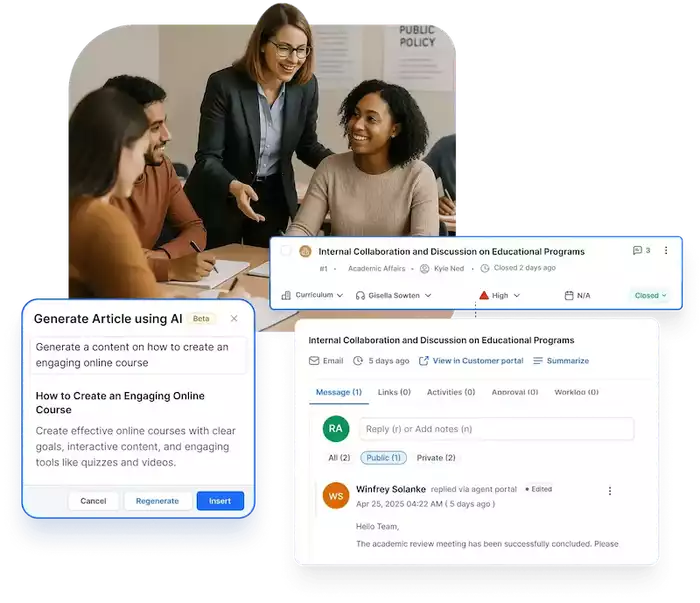
You cannot manage every ticket by hand as you grow. You need systems that help your team do better, faster work.
Knowledge Base and Self-Service
The best ticket is one that is never created. A detailed, easy-to-search knowledge base helps your customers. They can find their own answers without ever contacting your team. This is a win for everyone. The customer gets an instant answer. Your agents have more time to focus on complex issues. This is a key way to get fewer tickets.
Automation and AI reply 24/7
Automation is a modern support team's greatest ally. Chatbots are a powerful tool for this. They can handle simple questions instantly, 24/7. A customer asking "Where is your store?" or "What is your return policy?" can get an immediate, accurate answer.
This is a strategy many growing businesses use. For example, the Spa brand Little Garden uses Botcake to automate answers for common questions. This frees their human staff to handle complex orders and delivery issues. AI can also help in other ways. It can power smart ticket routing to the right agent. It can even read a customer's mood. It can flag angry customers to be helped first.
Standardized Responses and Templates
Your agents should not waste time typing the same answer over and over. Saved replies, or templates, are key to fast work. They also make sure your answers are the same and correct.
Templates should be a starting point, not a final copy. Agents must personalize these templates. They should use the customer's name and refer to their specific problem. This combines the speed of automation with the warmth of a human touch.
Training and Development
Your tools and processes are only as good as the people who use them. Your agents need ongoing training. This includes deep product knowledge so they can answer questions confidently. It also includes soft skills. Caring, clear talking, and patience are not optional. They are core job requirements. You should help your team learn and grow all the time.
Measuring Success: Metrics and Reporting
You cannot improve what you do not measure. Gut feelings are not enough. You need hard data to understand your performance and find areas for improvement.
Key Performance Indicators (KPIs)
You should track a few key metrics.
-
First Response Time (FRT): How long does a customer wait for that first reply?
-
Resolution Time: How long does itV? Measuring Success: Metrics and Reporting. You cannot improve what you do not measure. Gut feelings are not enough. You need hard data to understand your performance and find areas for improvement. A. Key Performance Indicators (KPIs) You should track a few key metrics.
-
First Response Time (FRT): How long does a customer wait for that first reply?
-
Resolution Time: How long does it take to solve the problem completely?
-
Customer Satisfaction Score (CSAT): Are customers happy with the support they received?
-
First Contact Resolution (FCR): How many issues do you solve in the very first interaction? This is a great number to track for speed and quality.
-
Ticket Volume and Trends: How many tickets are you getting? Are they increasing? What are they about?
Regular Reporting and Analysis
Collect this data. Then, you must use it. Run regular reports and analyze them. This data will clearly show you your pain points. You might find that one topic makes up 30% of your tickets. That tells you to create a knowledge base article for it. You might see that the resolution time is slow. That tells you your agents need more training or better tools. Use this data to make your whole process better.
Conclusion
Effective ticket handling is not one single action. It is a complete system. It joins the right tools, clear steps, and well-trained, caring people. Mastering this system is the key to moving customers from frustrated to loyal.
This is not a "set it and forget it" task. It is a path of always getting better. You must always check your results. Listen to feedback. And improve your methods.
The goal is to build a support experience that feels effortless for your customers. A powerful platform like Botcake can be a core part of this system. It helps you automate the simple, boring tasks. This frees your team to focus on what truly matters: the complex problems and the human connections that build lasting loyalty.