





UTM code tracking bridges the gap between marketing efforts and measurable outcomes. It helps you understand what drives your audience to act. This article walks you through everything needed to track, analyze, and improve your campaign performance.
Introduction
UTM code tracking enables you to trace exactly where your website traffic originates, giving you control over insight-driven marketing decisions. Keep reading to unlock full value and apply it at scale.
The Digital Marketing Landscape: Why Tracking Matters
In the modern marketing landscape, data is the core of every decision. Without accurate insights, campaign strategies become guesswork. Proper tracking and attribution allow businesses to identify which channels truly drive conversions and ROI. UTM code tracking plays a crucial role in connecting performance data with real marketing outcomes.
What are UTM Codes? A Quick Overview
UTM codes, short for Urchin Tracking Module, are small URL parameters added to links that help analytics tools capture essential data like traffic source, medium, and campaign name. By tagging your links, you can clearly see where users come from - whether it’s a Google ad, social post, or email newsletter - and measure how each effort contributes to your results.
Why This Guide is Essential
Mastering UTM code tracking provides clarity across all your campaigns. It reveals which channels perform best, helps optimize budget allocation, and supports better integration with analytics or CRM systems. This guide gives you a practical roadmap - from understanding UTM parameters to implementing, analyzing, and scaling them effectively across digital channels.
The Anatomy of a UTM Code: Understanding the Parameters

UTM codes are made up of five main parameters that tell you where your visitors come from and how they found you. Together, they help marketers measure what’s driving results.
The Five Core UTM Parameters
Each parameter adds a piece to the puzzle:
-
utm_source identifies the platform (like Google, Facebook, or a newsletter).
-
utm_medium tells you how users reached your site (cpc, organic, email, social).
-
utm_campaign tracks the purpose of your link, such as summer_sale or new_product_launch.
-
utm_term shows which paid keywords brought visitors (useful for PPC campaigns).
-
utm_content distinguishes between different ads or links, like banner_ad or text_link.
How UTM Parameters Work Together
When used together, these tags give you a clear view of what’s working across channels. For example, combining utm_source=facebook and utm_campaign=holiday_sale reveals how well your Facebook promotions perform.
Consistency in naming (like always using lowercase and hyphens) ensures clean, reliable data that’s easy to analyze later.
Building Your UTM Codes: Tools and Best Practices
Creating UTM codes can be as simple as just needing the right approach and tools to keep everything organized.
Manual UTM Code Creation
You can manually add UTM parameters by appending a question mark “?” to the base URL and then adding key-value pairs separated by “&”. Example:
https://yourdomain.com/page?utm_source=google&utm_medium=cpc&utm_campaign=launch
Manual creation risks:
-
Typos (e.g., UTM_soruce instead of utm_source)
-
Inconsistent naming (Uppercase vs lowercase)
-
Missing parameters leading to unattributable traffic
-
Forgetting to update multiple links for the same campaign
When data is messy, your reporting becomes unreliable.
Using UTM Builders/Generators
Tools like Google Campaign URL Builder or third-party UTM link generators simplify building UTM-tagged URLs by offering form fields for source, medium, campaign, term, and content.
Using a builder reduces human error, ensures consistent parameter naming, speeds up link creation, and allows tracking templates for recurring campaigns.
Essential Best Practices for UTM Naming
Stick to one format: e.g., always lowercase, use hyphens or underscores instead of spaces. Rather than generic names like “campaign1”, use “holiday-email-2025” so that later you know exactly what the campaign was.
Do not include personal data (PII) in your UTM parameters (such as email addresses, user names), because analytics systems may log this and create privacy risks. Create a reference guide (spreadsheet or doc) for your team, defining permissible values, separators, abbreviations, etc. It helps especially if multiple people create campaign URLs.
Implementing and Analyzing UTM Data
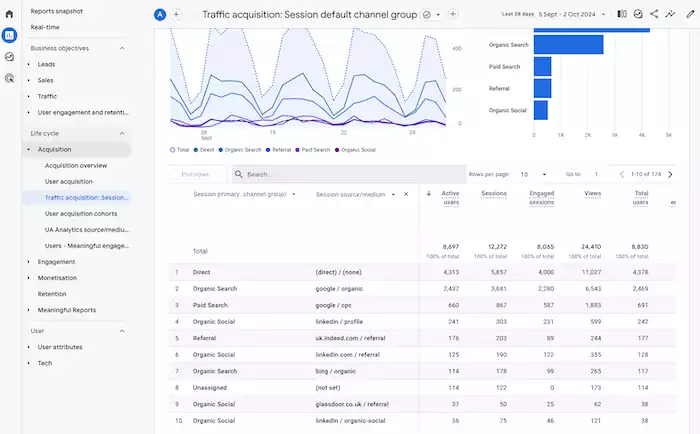
Once your UTM codes are ready, it’s time to use them in campaigns and analyze what the data reveals.
Where to Implement UTM Codes
Add UTM parameters to URLs used in paid ads so you can measure which ad platforms and creatives drive traffic and conversions. Tag links in newsletters, drip emails, and re-engagement messages to see which email messages and segments perform best.
Even for organic posts, apply UTM parameters (for example, utm_source=facebook&utm_medium=social) so you don’t mis-attribute social traffic as “direct”. When working with partner sites or content syndication, use UTM tags to track traffic coming from those external placements.
Even offline campaigns like flyers or QR codes can include tagged URLs (shortened), so when scanned, you can track them as a source.
Analyzing UTM Data in Google Analytics (or other analytics platforms)
In Google Analytics, navigate to Acquisition → Campaigns or Source/Medium to view UTM-tagged traffic and conversions.
Look at how utm_source + utm_medium pair, plus utm_campaign, drive traffic and outcomes. Identify which combinations outperform others.
You can create custom segments and reports to filter by campaign names, mediums, or specific content links (utm_content) to see deeper behavioral differences.
Interpreting Your Data: What Does it Tell You?
Through UTM code tracking, you can clearly see which campaigns and channels drove the highest traffic and conversion rates, allowing you to allocate budget accordingly.
Users arriving via email might behave differently (higher engagement, lower bounce rate) compared to users from social media. UTM data helps segment this.
Data-backed insights allow you to double down on high-performing campaigns, retire underperforming links, and fine-tune targeting and creatives.
Advanced UTM Tracking Strategies
After mastering the basics, it’s time to take your tracking to the next level. These advanced strategies help automate tagging, connect UTM data to CRM systems, and prevent common tracking errors.
Dynamic UTM Parameters
For large-scale campaigns or when using automation or ad platforms, you can use dynamic parameters (e.g., {source}, {campaign_id}) so that UTM values populate based on templates, reducing manual effort and error.
Dynamic tagging ensures every link is properly tagged without manual work, improves data consistency, and makes scaling multiple campaigns easier.
Integrating UTM Data with CRM and Other Systems
When UTM parameter values feed into your CRM (for example, via lead forms capturing utm_source or campaign), you can connect traffic origin to actual sales and revenue.
UTM code tracking plus CRM integration gives visibility into how a user went from click → site visit → lead → sale, across channels and campaigns.
Troubleshooting Common UTM Issues
If UTM tags are missing or malformed, traffic may default to “Direct” or “(not set)”, which distorts insights. Ensure all links in campaigns are tagged.
Variation in naming conventions (capital letters vs lowercase, inconsistent hyphens) causes fragmentation. Use a naming guideline.
If you tag your own internal links or use UTM tags incorrectly in internal navigation, you may create self-referrals, which distort attribution. Avoid applying UTM codes to internal links.
Common Use Cases and Real-World Examples

To see the real impact of UTM codes, let’s look at how different types of businesses use them to track performance, compare channels, and refine their marketing strategies.
E-commerce Businesses
When launching a new product, an e-commerce seller might use utm_source=instagram, utm_medium=social, utm_campaign=newproduct_sept2025 to track how social traffic drives sales for that launch.
By using utm_content=ad_variantA vs utm_content=ad_variantB, you can compare which creative (video, image, carousel) drives better engagement and conversion.
Content Marketers
When promoting a blog post on LinkedIn vs email, you might use utm_source=linkedin&utm_medium=social&utm_campaign=blog_promo_aug or utm_source=newsletter&utm_medium=email&utm_campaign=blog_promo_aug, allowing you to see which channel drives more blog traffic and leads.
If you syndicate content across partner sites, you can tag each partner link (utm_source=partner_siteX) and measure which collaboration drove the most visitors or subscribers.
Lead Generation Companies
A lead-gen consultant might tag email, LinkedIn ads, webinars, and then measure lead quality (via CRM) linked back to utm_campaign values to identify the highest‐value sources.
If leads from utm _source=webinar behave differently (higher conversion) than those from utm_source=email, you may tailor your nurturing flows accordingly - more aggressive offers for one, longer cadence for the other.
Conclusion
UTM code tracking is the backbone of data-driven marketing. You can transform every campaign into measurable insights by tagging your links correctly. Besides that, knowing exactly which sources, mediums, and creatives drive real results. As attribution and automation evolve, UTM tracking remains essential for accuracy and performance visibility.
Start implementing consistent UTM practices across all your campaigns today. For deeper analytics and automated tracking support, explore how Botcake.io can simplify and scale your marketing operations.