





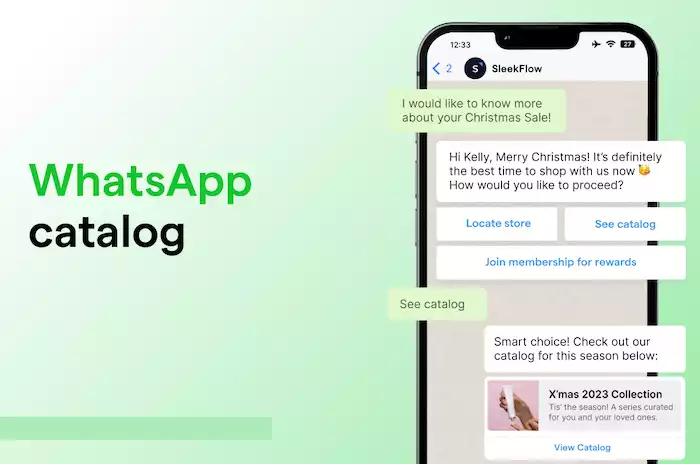

Turn your WhatsApp into a mobile storefront. This guide details the WhatsApp Catalog feature, a tool for showcasing products and services directly within the app, making it easier to engage customers and drive sales.
Introduction
The way we shop has undergone a complete transformation. We no longer just browse websites on our computers. We discover products on social media, ask questions in chat, and buy things directly from our phones. This shift to "conversational commerce" means businesses need to be where their customers are. With over two billion users, there is no more important platform than WhatsApp.
What is the WhatsApp Catalog?
The WhatsApp Catalog is a feature built into the free WhatsApp Business app that turns your business profile into a mobile storefront. It enables you to create a visually appealing, user-friendly showcase of your products and services, complete with images, descriptions, prices, and links. It is like having a mini e-commerce website right inside the app that your customers use every day.
Why Your Business Needs a WhatsApp Catalog
A WhatsApp Catalog does more than just show off your products. It streamlines the entire sales process, making it easier and more professional. Customers do not have to leave the chat to see what you sell. This convenience creates a much better experience. It also helps you build a professional brand image and makes it easier for you to talk about your products and close sales directly in the chat. This guide will walk you through everything you need to know, from setting up your first catalog to using it to grow your business.
Setting Up Your WhatsApp Catalog: A Step-by-Step Guide

Creating your WhatsApp Catalog is a simple process. You can have your mobile storefront up and running in just a few minutes.
Prerequisites: WhatsApp Business Account
First, you must be using the WhatsApp Business app. The catalog feature is not available on the regular personal version of WhatsApp. The Business app is available for free download and use. Setting up an account is as easy as verifying your business phone number.
Navigating to the Catalog Feature
-
Open your WhatsApp Business app and tap on the three dots in the top-right corner to open the menu.
-
Go to Settings > Business tools.
-
Tap on Catalog. This is where you will build and manage your entire product showcase.
Adding Your First Products/Services
Now for the fun part: adding your items.
-
From the Catalog screen, tap the green "Add new item" button.
-
Add Images: This is the most important part. You can add up to 10 high-quality images for each item. Your first image is the main one that people will see.
-
Item Name: Give your product a clear and simple name.
-
Price: Add the price for your product.
-
Description: Write a compelling description. We will cover tips for this later.
-
Link (Optional): If you have a website, you can add a direct link to the product page where customers can buy it.
-
Item Code (Optional): You can add a SKU or product code to help you keep track of your items.
-
Tap Save. WhatsApp will review your new item to make sure it follows their rules. This usually only takes a minute.
Organizing Your Catalog with Collections
If you have many products, you can group them into Collections to make it easier for customers to browse. This is like creating different aisles in a store.
-
In the Catalog manager, tap on "Add new collection."
-
Give your collection a name, like "New Arrivals," "Best Sellers," or "Men's Shoes."
-
Select the items from your catalog that you want to add to this collection.
-
Tap Done. Now your catalog is organized and easy to shop.
Optimizing Your WhatsApp Catalog for Maximum Impact
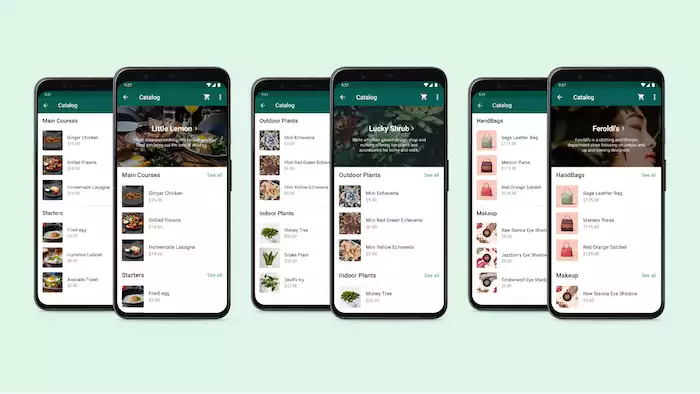
A good catalog is not just a list of products. It is a carefully crafted sales tool. Here is how to make yours great.
Crafting Compelling Product Descriptions
Your description is your chance to sell. Do not just list the features. Explain the benefits. Try this: "A soft, breathable 100% cotton shirt. It keeps you cool on hot Dubai days."" Keep it clear and easy to read.
High-Quality Imagery: The Visual Appeal
People buy with their eyes. Your product photos must be excellent.
-
Use good lighting and a clean, simple background.
-
Show the product from different angles.
-
Use high-resolution images so customers can zoom in to see the details.
Pricing Strategies and Transparency
Be clear and honest with your pricing. If the price changes, like for different sizes, you can do one of two things. You can leave the price field blank and write "Message for price" in the description. Or, you can set a base price.
Maintaining an Up-to-Date Catalog
Your WhatsApp Catalog is a living thing. You need to keep it fresh.
-
Add new products as soon as they arrive.
-
Promptly remove any items that are out of stock. There is nothing more frustrating for a customer than trying to buy something that is not available.
-
Update your collections for seasons or special promotions.
Leveraging Your WhatsApp Catalog for Sales and Engagement
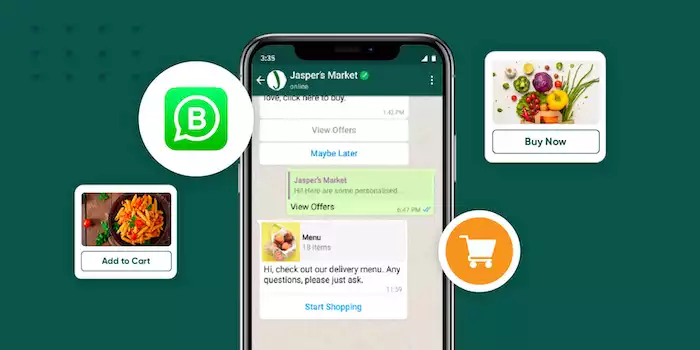
Once your catalog is set up and optimized, it is time to use it to make sales.
Sharing Your Catalog with Customers
This is where the magic happens. You can easily share your products without ever leaving the chat.
-
In a Chat: When a customer asks about a product, tap the paperclip (attachment) icon, select Catalog, and send them the specific item. They will see the image, price, and description right in the chat.
-
Share the Link: You can also share a link to your entire catalog. Go to your Catalog manager, tap the link icon at the top, and share it on your social media, in your email signature, or on your website.
Driving Sales Through Direct Conversations
The catalog is a conversation starter. When a customer sees a product they like, they can tap the "Message Business" button. This sends you a message with a picture of the product they are interested in. This makes it incredibly easy to start a sales conversation.
Integrating Catalog with Other WhatsApp Business Features
-
Quick Replies: Create quick replies for your most popular catalog items to answer questions even faster.
-
Labels: Use labels to keep track of customers. You can create a label like "Interested in Shoes" for anyone who has asked about an item from that collection.
-
Broadcasts: You can send a broadcast message to a segmented list of customers to announce a new collection or a sale. Just be careful to follow WhatsApp's rules to avoid being spammy.
Advanced Strategies and Best Practices
To take your WhatsApp Catalog to the next level, you need to think like a marketer.
Marketing Your WhatsApp Catalog
-
Promote it Everywhere: Your WhatsApp catalog link should be easily accessible. Put it in your Instagram bio, on your Facebook page, and on your website. You can also share your entire catalog or individual products directly to your WhatsApp Status. As your catalog grows, WhatsApp helps customers find what they need. Once your catalog contains more than 20 items, a search button will automatically appear, enabling customers to easily search for your products.
-
Run "Click to WhatsApp" Ads: You can run ads on Facebook and Instagram that, when clicked, open a conversation with your business on WhatsApp. You can even set these to go directly to your catalog. This is a highly effective way to attract new customers.
-
API Analytics: For businesses using the WhatsApp Business API, you can track analytics like product views and the number of messages sent from specific products.
By connecting the API to Botcake’s automation tools, you can boost sales and engagement with powerful automation tools, AI solutions, and CRM integration to leverage potential customer data. Businesses that use this strategy of combining ads with chat have seen remarkable results, including a 60% increase in leads and a 79% decrease in the cost to acquire them.
Compliance and Best Practices
You must follow WhatsApp's Commerce Policy. This means you cannot sell certain items, like illegal products, weapons, or animals. Always ensure that your product information is accurate and that you respond to customer inquiries promptly.
Conclusion
The WhatsApp Catalog is one of the most powerful free tools available to small and growing businesses today. It transforms your WhatsApp Business profile from a simple contact card into an interactive, shoppable experience. It makes it easier for customers to discover your products and easier for you to sell them.
While the catalog in the free app is a fantastic starting point, businesses looking to automate the sales process and manage a high volume of chats should explore the WhatsApp Business API. A platform like Botcake can integrate with your catalog, allowing an AI chatbot to answer questions about your products 24/7, just as it did for the fitness brand Kingsport, which saw a 13% conversion rate from chats. However, the journey into conversational commerce begins with a simple step: setting up and optimizing your WhatsApp Catalog today.