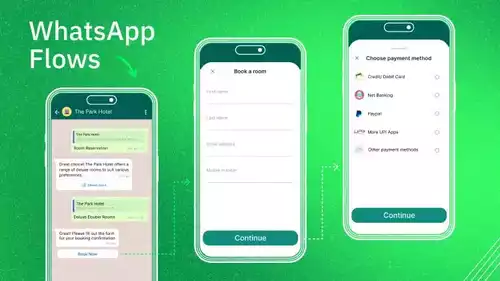






A WhatsApp CRM is a transformative tool that enables businesses, particularly in service sectors such as spas, education, and travel, to manage customer conversations efficiently. It solves the common problem of chats being scattered across different phones, which often leads to slow replies, lost sales, and a bad experience for everyone. By combining the fast, personal style of WhatsApp with the organized power of a CRM, this guide will explain what a WhatsApp CRM is, why you need one, and how it can transform your messy chats into a streamlined system for business growth.
What is a WhatsApp CRM?

Let's explain this. A normal CRM (Customer Relationship Management) is a tool that helps you save and manage all your customer information. A WhatsApp CRM is a system that connects your WhatsApp Business account to your CRM.
This means your WhatsApp chats are not stuck on one phone. Instead, they all go to one main screen that your whole team can see and use. Also, each chat is connected to that customer's information page. It is like a bridge connecting the world's favorite chat app to your main business tools. It turns WhatsApp from a simple messaging app into a professional tool for sales, marketing, and support. And it still keeps the personal feeling that customers love.
Why Your Business Needs a WhatsApp CRM
Today, customers want to chat with businesses just like they chat with their friends. They want fast, personal, and easy conversations. A WhatsApp CRM is the best way to give them this incredible experience. It helps you:
-
Centralized, automated communication for efficiency: Unify all customer messages in one place, automate routine tasks like order updates and confirmations, and enable multiple agents to collaborate seamlessly - reducing costs and boosting productivity.
-
Personalized customer engagement and better sales management: Leverage CRM data to create tailored, engaging interactions while managing leads and tracking the entire sales journey directly within your system.
-
Scalable insights and integrations for growth: Gain actionable analytics on customer satisfaction and agent performance, and scale effortlessly as your customer base grows.
Core Components of a WhatsApp CRM
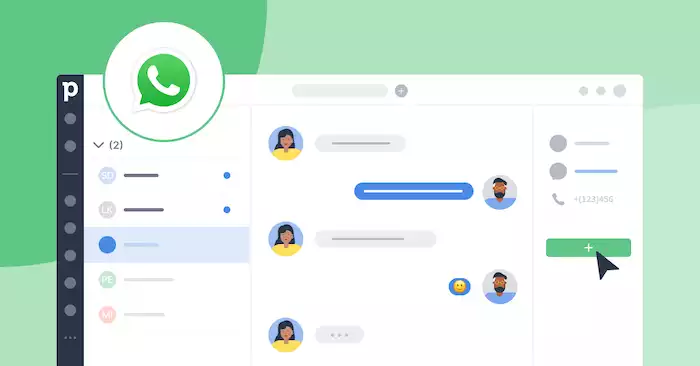
A good WhatsApp CRM is built on several key components. These parts work together to turn your messy chats into a clean and robust system for growth.
Unified Inbox
A shared inbox is the heart of a WhatsApp CRM. It collects all the messages from your WhatsApp number. It consolidates them in one central location that your entire team can access from their computers. This means many people on your team can log in and see every single chat. This one feature solves the biggest problem with the free WhatsApp Business app: the one-phone limit. In a unified inbox, you can assign conversations to specific team members, mark chats as "open" or "closed," and see who is working on what. It is the key to working together as a team without getting in each other's way.
Contact and Conversation Management
When a new customer messages you, an innovative CRM automatically makes a profile for them. It saves their name and number. Your team can then add more information, such as tags ("VIP customer," "new lead") or private notes that only your team can view. Every chat is saved on the customer's page. This creates a comprehensive record of everything you have discussed. This means that anyone on your team can join a chat and understand the whole story immediately, without needing to ask the customer to repeat themselves.
Automation and Chatbots
This is how a WhatsApp CRM helps your team get more done and saves a considerable amount of time. You can set up AI-powered chatbots to handle everyday tasks for you. A chatbot can work like a 24/7 AI helper. It can greet new customers, understand natural language to answer common questions like "What are your hours?", and gather basic information before passing the chat to a live representative. This AI solution ensures that every customer receives an instant, intelligent response, even if your team is busy or unavailable.
Analytics and Reporting
You cannot improve if you don't know how you are doing. A good WhatsApp CRM gives you reports on your team's work. You can view important metrics, such as the time it takes to respond to a customer, the number of chats each team member handles, and the most frequently asked questions. This information is like a report card for your customer service. It helps you identify problems, train your team, and further enhance your sales and support.
Key Functions and Use Cases
A WhatsApp CRM is a tool that can help your whole business, from finding new customers to keeping your current ones happy. Here is how different teams can use it to get great results.
Sales and Lead Nurturing
For your sales team, a WhatsApp CRM is a great way to turn chats into money. It makes the entire sales process faster and more personal.
-
Find Good Leads Fast: When a new person messages you from a Click-to-WhatsApp ad, a chatbot can ask them a few simple questions. This helps make sure your sales team only spends time on the best leads. By using this method, businesses have seen a 79% lower cost per acquisition compared to traditional lead forms.
-
Talk to Customers and Sell: Salespeople can have personal chats with customers. They can send product pictures, videos, and menus right in the chat. This friendly way of talking helps answer questions quickly and makes it easier for the customer to decide to buy. By using a WhatsApp CRM with an AI helper to guide customers, businesses have seen a 4.49x return on media spend and a 5x lower acquisition cost compared to other channels.
Customer Support and Service
A WhatsApp CRM can make your customer support fast and helpful, instead of slow and frustrating. It helps you solve problems quickly and keep customers satisfied.
-
Real-Time, Personal Support: When a customer has a problem, they can just send you a message. Your support team can see their full history in the CRM, including past orders and conversations. This helps them give a fast and personal answer without asking the customer to repeat information.
-
Proactive Updates: You can send automatic messages about orders, shipping, or other important updates. Using "Utility messages" with content drafted on Business Solution Providers (BSPs) helps businesses stay easily connected with customers about order updates, security alerts, appointment reminders, or service updates. This means fewer "Where is my order?" questions for your team to answer, and it keeps your customers happy and informed.
Marketing and Engagement
You can also use a WhatsApp CRM to run marketing campaigns that really work and get seen by your audience.
-
Targeted Broadcasts: You can send marketing messages to specific groups of customers. For example, you can send a special deal only to your "VIP customers" or people who have bought from you before. This makes your marketing much more effective.
-
Proven Success: Brands using a WhatsApp CRM for marketing have distributed over 17 million coupons and achieved a 70% coupon conversion rate, showing just how powerful this channel is for driving sales.
Choosing and Implementing a WhatsApp CRM
Getting started with a WhatsApp CRM is a big and important step. It is key to choose the right tool and have a good plan for how you will use it.
Key Considerations
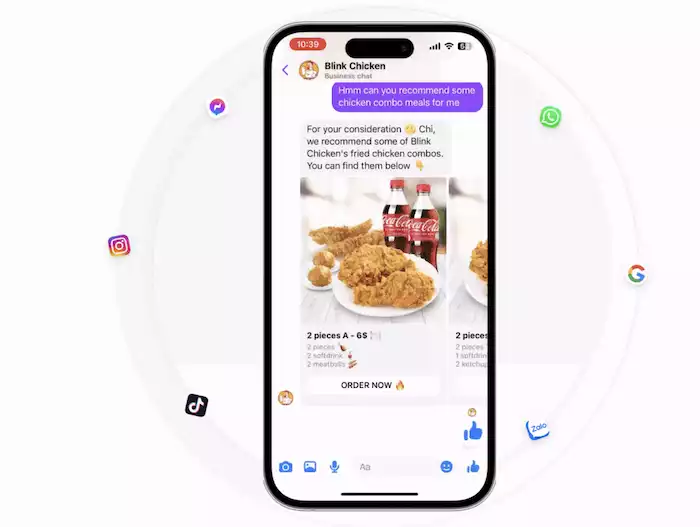
When you look for a WhatsApp CRM, you need a tool that is strong but also simple to use. Some tools are just a basic inbox. Others, like Botcake, give you a complete platform for selling through chat. Botcake is a great choice because it is a top Meta partner. It does not just give you a WhatsApp CRM, but it also connects it with Facebook Messenger and Instagram. This creates one single system for all your customer conversations.
When you are choosing, you should ask these questions:
-
Integration: Can it connect easily with my other tools, like my online store or my current sales software?
-
Features: Does it have the main features I need, like a shared inbox, a chatbot builder, and good reports?
-
Compliance: Does the tool help me follow all of WhatsApp's rules about messaging and privacy?
Implementation Best Practices
-
Have a Clear Plan: Before you start, have a plan for how you will use WhatsApp. For example, what questions will the bot answer? What kind of tone and personality should your messages have? And when should a chat go to a real person?
-
Train Your Team: A new tool only works if your team knows how to use it. Show your team how to use the new inbox. Also, teach them the best ways to chat with customers on WhatsApp to provide great service and represent your brand well.
Conclusion
A WhatsApp CRM is now a must-have for any business that wants to do well; it’s how modern service-based businesses operate. This integration creates a powerful, organized system built on seamless data, deep automation, and true personalization. It enables you to manage the entire customer journey in one place, providing your team with the tools to build strong relationships, close more sales, and deliver exceptional support. To meet customers with the fast, personal experience they demand and build a more efficient business, it's time to leverage a powerful WhatsApp CRM solution like Botcake.